DevOps Tools – High-Level Overview
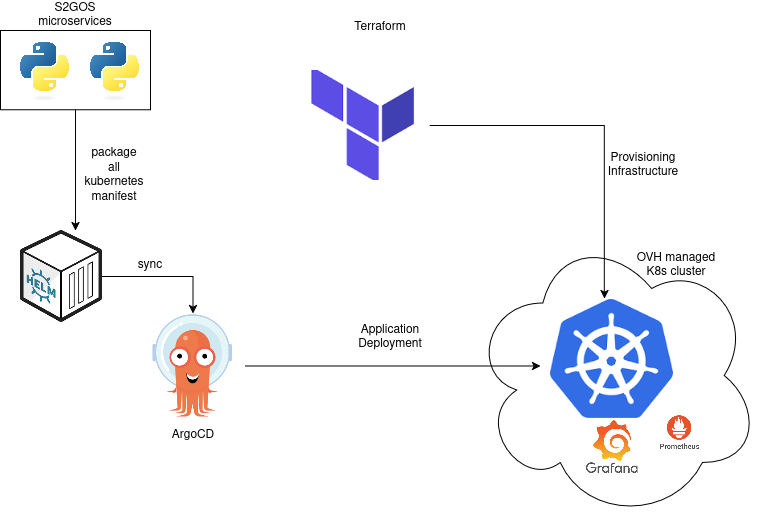
To deliver and operate the S2GOS service efficiently, we apply modern DevOps practices. These ensure that software is built, tested, and deployed in a reliable, repeatable, and secure way. The main tools can be grouped as follows:
-
Infrastructure & Deployment
-
Kubernetes– the platform on which all services run. It allows applications to scale automatically, restart when needed, and be isolated for reliability. -
Helm– a package manager for Kubernetes. It makes deploying complex applications much simpler and ensures they can be installed the same way across different environments. -
Terraform– used to set up the underlying cloud resources (servers, storage, networks). It guarantees that infrastructure is defined in code, so it can be reproduced, audited, and updated consistently. -
Continuous Integration & Delivery (CI/CD)
-
GitHub Actions– automates testing and building of the software whenever code changes are made. This reduces errors and speeds up development. -
ArgoCD– ensures that what is defined in the project repositories is always reflected in the running system. It continuously monitors and synchronizes deployments, reducing manual intervention. -
Monitoring and Observability
-
Prometheus and Grafana– provide live insights into the system’s health and performance (e.g., resource usage, response times). This allows early detection of issues and helps optimize resources. -
Jaeger– used for tracing requests across services, which helps diagnose problems and improve efficiency of workflows. -
Security and Access
-
Keycloak– a central system for user authentication and authorisation. It enables single sign-on and ensures that only authorised users can access services. -
Sealed Secrets- allows us to store passwords and keys safely in Kubernetes without exposing them in plain text.
Building the server image
The s2gos-server container image is built with the
build-image.sh
script, which wraps docker build and pins the eozilla packages (gavicore,
procodile, wraptile) to a given version.
# Build, tagging the image from the s2gos-server version:
./s2gos-server/build-image.sh

# Build with an explicit tag:
./s2gos-server/build-image.sh -t dev

# Build and push to the registry:
./s2gos-server/build-image.sh -t 0.2.0 --push

# Build against a specific eozilla version:
./s2gos-server/build-image.sh --eozilla-version 0.3.0
The image repository defaults to quay.io/s2gos/s2gos-server; override it with
-r/--repo or the IMAGE_REPO environment variable. Run
./s2gos-server/build-image.sh --help for the full list of options.